
Pipeline management is the work of tracking every open sales opportunity by stage and improving how those opportunities move from first contact to a signed deal. It applies to sales and business development pipelines alike, and it gives the team a current view of where each opportunity stands.
The pipeline is the set of open deals grouped by stage, and pipeline management covers the work that keeps that set accurate and moving. A sales funnel is a wider view, showing how a whole group of buyers narrows from first awareness to purchase, so marketing teams often plan around the funnel, while sales teams work deal by deal in the pipeline. Sales managers own the pipeline, and revenue operations (RevOps) maintains the CRM setup and reports behind it.
What Does Sales Pipeline Management Involve?
Sales pipeline management involves these recurring activities:
- Stage management: Each open deal sits in a defined stage and moves forward when the buyer reaches the milestone agreed for that stage. Shared stages give everyone on the team the same reading of where a deal stands.
- Lead qualification: New leads are checked against your ideal customer profile (ICP) before they become deals. This keeps the pipeline focused on opportunities with a real chance of closing.
- Activity tracking: Reps log each buyer conversation against its deal in the CRM, so the record shows when the buyer last engaged and what was agreed.
- Follow-ups: Every deal has a planned next contact, timed to its stage and the buyer's last response, which keeps the conversation going between meetings.
- Pipeline reviews: Managers hold sales pipeline reviews with each rep, usually once a week, to check progress and agree the next action on each one.
- Performance analysis: Conversion rates and sales velocity show where deals move quickly and where they slow down, which points the team to the stage worth improving.
- Forecasting: Managers turn the open pipeline into an estimate of the revenue the team expects to close in the month or quarter.
Why Is Pipeline Management Important?
Pipeline management gives a sales team an accurate picture of the revenue it is likely to win and the work needed to get there.
- Forecasts built on deal data: When every deal carries a value and a close date, the forecast comes from adding up real opportunities, and leaders can trace each number back to the deals behind it.
- Time spent on the right deals: Reps see which opportunities are most likely to close and give those the most attention.
- Bottlenecks that show up in the numbers: Conversion rates by stage show the exact step where deals slow down. A low rate from Proposal to Negotiation, for example, directs attention to pricing or scope.
- Coaching based on evidence: Managers compare each rep's stage-by-stage conversion with the team average and coach on the stage where that rep differs most.
- A clear view of the gap to target: Pipeline coverage shows whether there are enough deals to reach the period's target, which tells marketing and outbound teams how much new pipeline to add.
What Are the Stages of a Sales Pipeline?
Stage names differ between companies, and most B2B pipelines follow a sequence close to this one:
- Lead: A company or contact that matches your ICP, either because they showed interest or because a rep found them through outbound research.
- Qualified: The rep has confirmed the company has a problem you solve and a reason to look at it now.
- Discovery: Conversations focus on the buyer's current process and how they measure it.
- Demo or solution presentation: The rep gives a sales demonstration, showing how the product or service handles the buyer's situation.
- Proposal: The buyer receives written pricing and scope.
- Negotiation: Both sides agree the final terms and the contract.
- Closed won or closed lost: The deal is signed, or it leaves the pipeline as lost.
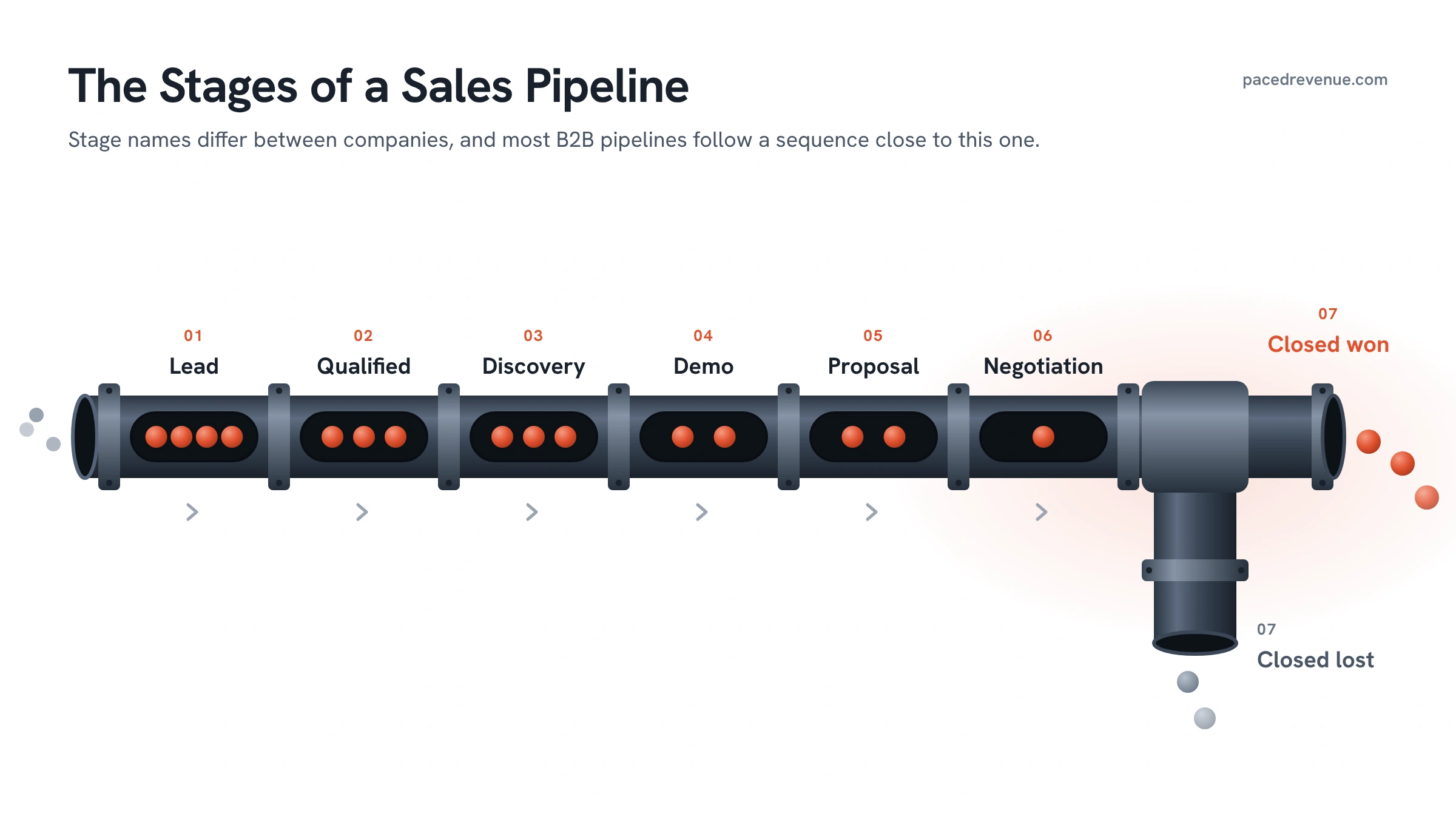
Shorter, transactional sales, where one person buys a lower-priced product, often merge discovery and demo into a single stage. Enterprise sales tend to add stages for technical evaluation or security review.
How to Manage a Sales Pipeline
Define When a Deal Can Move to the Next Stage
Exit criteria for sales stages are the conditions a deal has to meet before it moves to the next one. Criteria based on what the buyer has done, such as attending a discovery call or asking for a proposal, work well because the rep and their manager can both see that action in the CRM record. When every rep moves deals on the same buyer actions, each stage holds the same kind of deal across the team, so stage totals in reports and forecasts compare like with like.
Examples of buyer-based exit criteria:
- Lead to Qualified: The contact has replied and agreed to a first conversation.
- Qualified to Discovery: A discovery call is booked.
- Discovery to Demo: The buyer has described the problem and the result they want.
- Demo to Proposal: Pricing or a proposal has been requested by the buyer.
- Proposal to Negotiation: The buyer has reviewed the proposal and raised terms to discuss.
Once the rules are set, give each stage a win probability based on the share of past deals at that stage that went on to close. Teams with little sales history start with estimates and update them as closed deals build up.
Qualify and Prioritise Opportunities
Qualification decides which leads become deals in the pipeline. It starts with a clear ICP definition, describing the companies that get the most value from what you sell, usually by industry, company size, location and the problem they need solved. Many teams add a framework such as BANT or MEDDIC, which gives every rep the same checklist of questions to confirm before a deal counts as qualified.
Lead scoring ranks the leads that pass qualification. A fit score measures how closely a company matches your ICP, and an engagement score adds points for actions such as replying to an email, attending a webinar, visiting the pricing page or requesting a demo. Reps work the highest combined scores first.
For deals already in the pipeline, multiply each deal's value by its stage probability to get its expected value, and work the highest expected values first. Close dates break ties, with the nearest dates first.
Record the Owner, Value and Next Step for Each Deal in Your CRM
These three fields turn a deal record into something the whole team can act on.
- Owner: Assign each deal to one rep, who is responsible for moving it forward. A single owner also lets managers report on each rep's pipeline.
- Value: Enter the amount you expect the contract to be worth. If you sell subscriptions, pick one convention, such as annual contract value (ACV) or total contract value (TCV), and apply it to every deal so totals add up correctly.
- Next step: Record the next action on the deal and the date it is due, so anyone opening the record knows what happens next and when.
Setting all three as required fields in the CRM means every new deal starts with them filled in.
Sales Pipeline Metrics to Track
Some pipeline metrics measure size, meaning how much potential revenue is open. Others measure performance, meaning how deals convert and how quickly they close.
Size metrics
- Pipeline value: The total value of all open deals.
- Deals by stage: The number of open deals in each stage, which shows where the pipeline is concentrated.
- Weighted pipeline value: The sum of each open deal's value multiplied by its stage probability. Many forecasts start from this figure.
- Pipeline coverage: Pipeline value for the period ÷ revenue target for the period. How much pipeline a team needs follows from its win rate. The coverage to aim for is 1 ÷ win rate, so the share of pipeline the team wins is enough to reach the target.
Performance metrics
- Stage conversion rate: Deals that moved to the next stage ÷ deals that entered the stage.
- Win rate: Deals won ÷ (deals won + deals lost). Teams also calculate it by value, using deal amounts in each part of the formula.
- Average deal size: Total value of won deals ÷ number of won deals.
- Sales cycle length: The average number of days from deal creation to close, across won deals.
- Time in stage: Each stage's average duration in days. Comparing a deal's age in its stage against this average shows which deals are moving slower than usual.
- Sales velocity: (Number of open opportunities × average deal size × win rate) ÷ sales cycle length in days. The result is the revenue the pipeline produces per day. Comparing how each input moves the result shows which improvement adds the most revenue.
- Forecast accuracy: The gap between the revenue forecast at the start of a period and the revenue actually closed by its end.
Sales Pipeline Management Best Practices
Keep Deal Stages, Values and Close Dates Up to Date
Deal records are most accurate when reps update them straight after each buyer conversation, while the details are fresh. A same-day rule is easy to check and keeps the weekly forecast close to what is happening in each deal.
Each field has its own update trigger:
- Stage: A deal moves forward when it meets the exit criteria for its current stage, and it moves back when the buyer reopens an earlier question, such as scope.
- Value: Update the amount whenever the scope changes, for example when the buyer adds users or removes a service.
- Close date: Close dates reflect what the buyer has said about their timeline. CRMs such as Salesforce and HubSpot keep a history of changes to the date, so managers see which deals have moved more than once and talk them through with the rep.
Set a Consistent Follow-Up Schedule
A follow-up schedule sets how often each buyer hears from you and through which channel. The most reliable follow-up is one the buyer has already agreed to, and ending each call by booking the next one gives every active deal a date in the calendar.
For leads who are yet to reply, a sequence gives the outreach structure. A sequence is a pre-planned series of touches across channels, spread over two to four weeks, and a typical one looks like this:
- Day 1: Send a short email tied to the reason for getting in touch.
- Day 3: Call, leaving a voicemail if nobody answers.
- Day 6: Connect or send a message on LinkedIn.
- Day 10: Follow up by email with something useful, such as a relevant case study or guide.
- Day 15: Call again.
- Day 21: Close the sequence with an email asking whether to keep in touch.
Deals further along the pipeline follow the buyer's pace, with contact after each agreed milestone, such as a proposal review or a contract draft. Logging every touch in the CRM lets anyone who picks up the deal see the full history.
Review Stalled Deals Weekly and Decide Which to Re-Engage or Close Out
A deal counts as stalled when it has gone past the team's set limit with no buyer activity, or when it has spent much longer in its current stage than the team's average for that stage. A saved CRM view can filter for both, which gives the weekly review a ready-made list.
For each stalled deal, the owner and manager pick one of two outcomes:
- Re-engage when the buyer still has the problem and there is a fresh reason to talk. That reason can be news relevant to their situation, such as a new feature or a change at their company. A different contact who owns the same problem also gives a reason to get back in touch. Re-engaging a stuck deal works best when the message asks one direct question about timing or priorities.
- Close out when re-engagement gets no reply or the buyer has said the project is on hold or going elsewhere. Mark the deal closed lost with a reason from a fixed list, such as timing, price, chose another option, no decision or poor fit.
Closing out deals keeps the weighted pipeline and forecast based on live opportunities, and the loss reasons build into a record of where and why deals end. Closed-lost contacts can move into marketing nurture (regular emails and content for leads who are yet to buy) and return to the pipeline when their timing changes.
Automate Routine CRM Tasks
CRMs and sales engagement tools can handle much of the record-keeping around each deal. Common automations include:
- Activity capture: Email and calendar sync logs messages and meetings against the right contact and deal.
- Lead routing: New inbound leads go to a rep automatically by territory or by round-robin (an even rotation across the team).
- Tasks on stage change: Moving a deal into a stage creates the standard tasks for it, such as an onboarding handover task once a deal is marked closed won.
- Stalled-deal alerts: The owner gets a notification once a deal passes the inactivity limit.
- Data enrichment: Fields such as industry and headcount fill in from a data provider when a new company is added.
- Call summaries: Conversation intelligence tools transcribe calls and add a summary and action items to the deal.
- Sequence enrolment: New leads join the right follow-up sequence based on their source or score.
Activity capture is a good first automation, because the follow-up schedule and stalled-deal alerts both depend on complete activity data.
Where to Start With Pipeline Management
For a team setting up pipeline management for the first time, the stage definitions and required CRM fields come first, since every report and forecast draws on them. The weekly review can start in the same month. Metrics such as win rate and sales cycle length become reliable once a few months of deals have closed under the new stages, so they join regular reporting after that point.